Ornament Acorn Gnome Delivery: Mastering Your Christmas Printables
The holiday season brings a unique blend of joy and logistical chaos. For creators, small business owners, and DIY enthusiasts, the pressure to produce high-quality, memorable decorations is real. This is where digital assets like the Ornament Acorn Gnome Delivery collection become invaluable. These aren't just cute images; they are functional design tools meant to bridge the gap between digital creativity and physical decor. However, simply downloading a file does not guarantee a professional result. Many users stumble over technical specifications and printing nuances, turning what should be a delightful project into a frustrating experience.
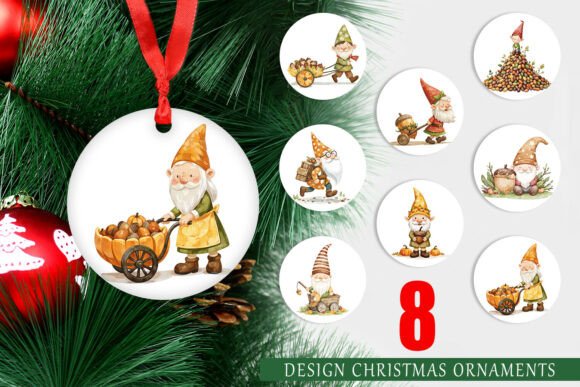
Understanding the specifics of this set—eight circular decorative designs featuring whimsical gnomes and acorns—is the first step toward success. These files are engineered for precision, offering 5x5 inch dimensions at 1500x1500 pixels and 300 DPI. Yet, without proper handling, even high-resolution assets can fail to meet expectations. Let’s explore the common pitfalls associated with using these printable designs and how you can avoid them to ensure your Christmas tree decorations look polished and professional.
Misunderstanding Resolution and Print Quality
One of the most frequent errors beginners make is ignoring the relationship between pixel dimensions and physical print size. The Ornament Acorn Gnome Delivery PNGs are provided at 300 DPI (dots per inch). This is the gold standard for crisp, clear printing. However, if you resize these images incorrectly in your design software, you risk degrading that quality. Stretching a 1500x1500 pixel image beyond its intended 5x5 inch output will result in pixelation. Conversely, shrinking it too much without adjusting settings can lead to unnecessary data bloat or rendering issues in certain print drivers.
The Fix: Always maintain the aspect ratio and respect the native resolution. When importing these PNGs into programs like Canva, Photoshop, or Illustrator, ensure your canvas size matches the final output intent. If you are printing directly at 5x5 inches, do not upscale the image. If you need a larger ornament, consider that these specific files are optimized for standard bauble sizes. For larger projects, you would need a different source file. Checking the image properties before sending them to the printer saves wasted material and time.
Overlooking Color Profiles and Printer Compatibility
Digital screens display color using RGB (Red, Green, Blue), while printers use CMYK (Cyan, Magenta, Yellow, Key/Black). A common misconception is that what you see on your monitor is exactly what will come out of your printer. With the vibrant reds and greens typical of gnome and acorn themes, this discrepancy can be noticeable. Your bright digital crimson might print as a dull maroon if not managed correctly.
Furthermore, not all home printers handle heavy ink coverage well. The detailed illustrations in the Ornament Acorn Gnome Delivery set may require significant ink density. Using standard copy paper instead of cardstock or photo paper will result in soggy, warped ornaments that lack durability. This is not a flaw in the design but a mismatch in materials.
Better Approach: Perform a test print on the exact paper stock you intend to use. If possible, calibrate your monitor or use a printer profile that matches your device. For home users, selecting "High Quality" or "Photo" settings in your printer dialog box ensures the ink is laid down smoothly, preserving the intricate details of the gnome’s hat and the texture of the acorn.
Neglecting the Cutting Process
Since these are circular designs, the finishing touch is the cut. Many hobbyists attempt to cut these out with scissors, which often leads to jagged edges and uneven circles. This undermines the professional look of the printable design. Even with a craft knife, achieving a perfect circle by hand is difficult and time-consuming, especially when producing a set of eight or more.
If you are using a cutting machine like a Cricut or Silhouette, another mistake arises: failing to use proper bleed or cut lines. While these PNGs are ready to print, they do not inherently contain vector cut paths. You must manually add a circular cut line in your design software that aligns perfectly with the edge of the graphic. Misalignment here means either cutting into the design or leaving an unsightly white border.
Practical Advice: Use a circle punch for quick, consistent results if you are doing manual assembly. For machine cutting, import the PNG into your software, overlay a perfect 5-inch circle vector, and align it carefully. Print then cut workflows require precise calibration of your machine’s sensors to read registration marks if you are using printed sticker paper or vinyl.
Ignoring Licensing and Usage Rights
For entrepreneurs and small business owners, understanding the license attached to digital downloads is critical. A common oversight is assuming that purchasing a downloadable set grants unlimited commercial rights. While many creators offer generous terms, some restrict the number of physical items you can sell or prohibit the redistribution of the digital files themselves. Using the Ornament Acorn Gnome Delivery files to create physical ornaments for sale is typically acceptable, but selling the PNGs as-is is usually strictly prohibited.
Violating these terms can lead to account bans on marketplaces or legal issues. It is essential to read the specific license agreement provided with your download. This protects your business and respects the intellectual property of the designer.
What to Check: Before listing products on Etsy or at local craft fairs, verify whether attribution is required and if there are caps on production volume. Keep a record of your purchase and license terms. This due diligence ensures your creative venture remains sustainable and ethical.
Maximizing the Versatility of the Set
Finally, many users limit themselves to traditional tree ornaments. While these circular designs are perfect for hanging decorations, their utility extends further. Consider using them as gift tags, coaster designs, or elements in holiday greeting cards. The high resolution allows for flexibility in scaling down for smaller applications without loss of quality.
By thinking beyond the obvious, you increase the value of your purchase. The cohesive theme of gnomes and acorns provides a rustic, woodland aesthetic that pairs well with natural decor elements like pinecones, twine, and wood slices. Integrating these digital prints into a broader design scheme enhances the overall visual impact of your holiday presentation.
In conclusion, the Ornament Acorn Gnome Delivery set offers a fantastic foundation for festive creativity. By paying attention to resolution, color management, cutting techniques, and licensing, you transform simple PNG files into cherished keepsakes or profitable products. Avoid the common shortcuts, respect the technical specifications, and let your attention to detail shine through in every printed piece.