Ornament Grumpy Witch: Avoiding Common Pitfalls When Using Printable Christmas Designs
The holiday season often brings a desire to break away from traditional, overly sweet aesthetics. This is where the Ornament Grumpy Witch concept shines. It offers a whimsical, slightly subversive twist on classic Christmas decor, appealing to those who appreciate humor and character over conventional cheer. However, moving from a digital file to a physical ornament involves more than just hitting "print." Many creators and hobbyists stumble not because they lack creativity, but because they overlook technical details that drastically affect the final quality.
Whether you are a small business owner looking to expand your holiday catalog or a DIY enthusiast wanting unique tree decorations, understanding the nuances of high-resolution printable designs is crucial. The difference between a professional-looking product and a disappointing craft project often lies in the preparation phase. Let’s explore common mistakes made when working with sets like the Ornament Grumpy Witch PNG collection and how to ensure your results are crisp, durable, and visually striking.
Misunderstanding Resolution and Print Quality
One of the most frequent errors beginners make is assuming that any image found online is suitable for printing. Digital screens and physical printers operate differently. An image that looks sharp on your monitor may appear pixelated or blurry when printed if the resolution is insufficient. This is particularly important for circular decorative designs where fine details, such as the witch’s expression or intricate hat patterns, need to remain clear at a small scale.
The Ornament Grumpy Witch set specifies files that are 1500x1500 pixels at 300 DPI (dots per inch). This specification is not arbitrary. For high-quality printing, especially on materials like cardstock, wood, or ceramic blanks, 300 DPI is the industry standard. If you attempt to upscale a lower-resolution image, you will introduce artifacts and softness that cannot be corrected later. Always verify the file properties before starting your project. If the file is smaller than the required dimensions for your intended print size, do not use it. Instead, source designs that are explicitly created for print purposes.
A better approach is to check the physical dimensions alongside the pixel count. A 5x5 inch design at 300 DPI ensures that every inch of the ornament is rendered with enough data to look sharp. If you are printing multiple ornaments on a single sheet, ensure your printer settings match this density. Scaling down is generally safe, but scaling up is rarely successful without specialized software and even then, results vary.
Overlooking Material Compatibility
Another common oversight is ignoring how the design interacts with the chosen material. The Ornament Grumpy Witch designs are versatile, but they behave differently on glossy photo paper versus matte cardstock or sublimation blanks. Printing on the wrong surface can lead to ink bleeding, poor color saturation, or a lack of durability.
For example, if you are using inkjet printers, standard copy paper will absorb too much ink, causing the colors to look dull and the paper to warp. This is especially problematic for circular cuts, where warping can make the ornament look uneven. Conversely, laser printers may not adhere well to certain coated papers designed for inkjets. Always test a single print before committing to a full batch. This small step saves time, money, and frustration.
If you are creating physical ornaments for sale or gifting, consider the finish. A matte finish often reduces glare and makes the colors appear richer, while a glossy finish can make images pop but may show fingerprints easily. For wooden ornaments, using a sealant before and after printing can protect the design and enhance the vibrancy of the Ornament Grumpy Witch artwork. Ignoring these material interactions can result in products that look amateurish or fail to last through the holiday season.
Neglecting the Cutting Process
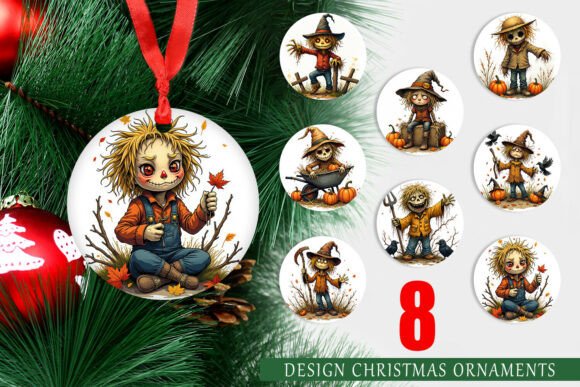
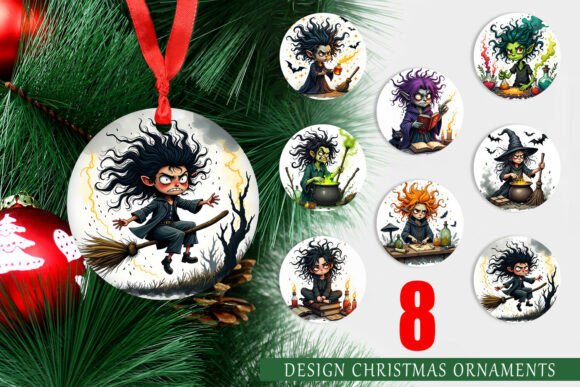
Even with a perfect print, the final presentation depends heavily on how the ornament is cut. The set includes eight circular designs, each 5x5 inches. Cutting these out neatly requires precision. Many hobbyists use standard scissors, which can result in jagged edges or uneven circles. This detracts from the professional appearance of the ornament.
To avoid this, use a circle punch tool or a cutting machine like a Cricut or Silhouette. These tools ensure consistent, clean edges that complement the circular design. If you are cutting by hand, consider using a template or a compass to guide your cuts. Additionally, leave a small white border around the design if the cut is not perfectly aligned. This acts as a safety margin and can look intentional and stylish.
Another detail often missed is the back of the ornament. If you are gluing the printed design onto a blank, ensure the adhesive is applied evenly to prevent bubbles or wrinkles. Bubbles can distort the image of the Grumpy Witch, making her expression look skewed. Use a brayer or a credit card to smooth out the design after application. Taking care with the assembly process elevates the final product from a simple craft to a polished decorative item.
Ignoring Licensing and Usage Rights
For entrepreneurs and small business owners, understanding licensing is critical. Just because you purchased a digital download does not automatically grant you the right to sell physical products made from it. Always read the license agreement associated with the Ornament Grumpy Witch PNG set. Some designers allow commercial use for physical items but prohibit digital resale or mass production without additional fees.
Violating these terms can lead to legal issues and damage your reputation. On the other hand, respecting intellectual property builds trust within the creator community. If you plan to sell ornaments featuring these designs, ensure you have the appropriate commercial license. This might involve purchasing an extended license or adhering to specific sales limits. Being proactive about rights management protects your business and supports the artists who create these resources.
Final Checks Before Production
Before you print your entire batch, perform a final review. Check the color profile of your files. Most home printers use CMYK, while digital files are often in RGB. Colors may shift slightly during conversion. Soft blues might turn purple, or bright greens might appear dull. Adjusting the brightness and contrast in your editing software can help compensate for these shifts. Print a test page and compare it to your screen under natural light. This step ensures that the Ornament Grumpy Witch colors match your expectations.
Additionally, organize your workflow. Keep your digital files backed up and labeled clearly. With a set of eight designs, it is easy to lose track of which file corresponds to which variation. Creating a proof sheet can help you visualize the final arrangement and ensure you are using the correct designs for each ornament. Attention to these small details streamlines the production process and enhances the overall quality of your holiday decorations.
In conclusion, creating beautiful ornaments with the Ornament Grumpy Witch PNG set is achievable with careful planning. By respecting resolution requirements, choosing compatible materials, refining your cutting technique, and adhering to licensing terms, you can avoid common pitfalls. These steps ensure that your final products are not only charming and unique but also professional and durable. Whether for personal enjoyment or commercial sale, taking the time to get the details right makes all the difference.